IMAGE TO 3D
3D model generation
Generate 3D geometry or a complete stylized model from a single image.
Last updated: 2026-08-20
3D generation analyzes silhouette, proportion and visual features to create an asset that can continue through retopology, UV unwrapping and texturing.
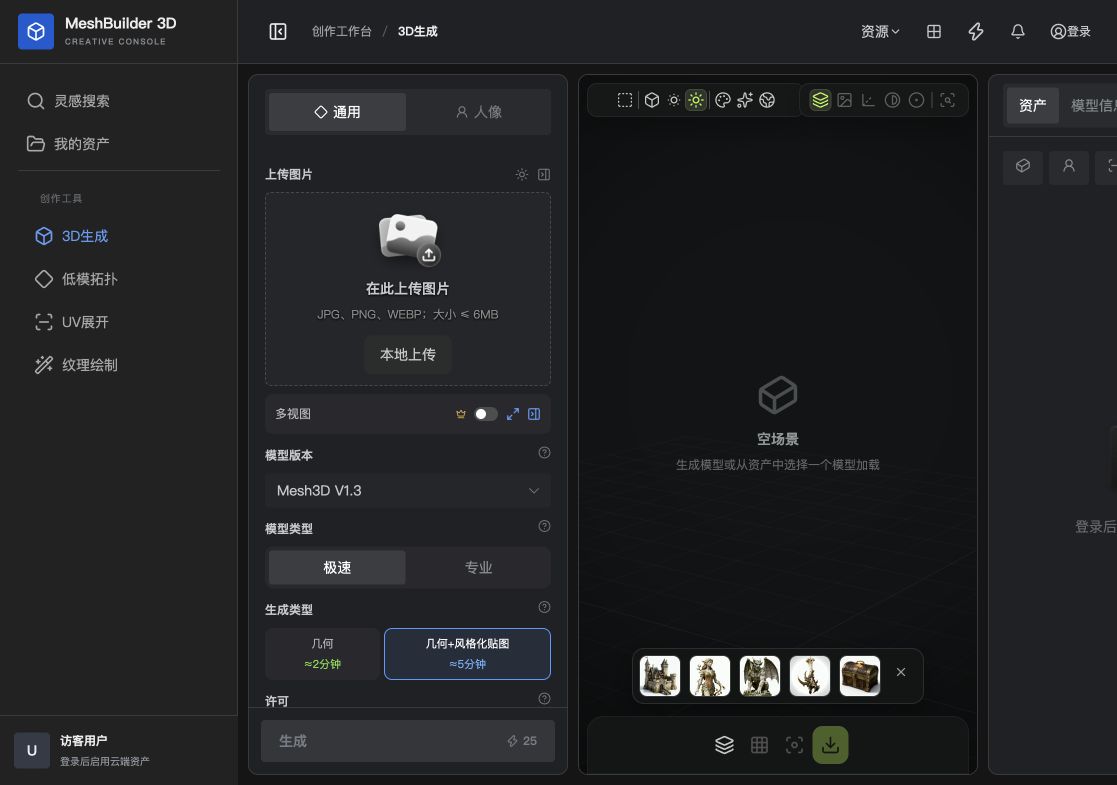
Upload an image
Upload a JPG, PNG or WebP in General or Portrait mode. The maximum file size is 6 MB. Portrait is intended for people; General suits products, props, animals and other objects.
Settings
| Setting | Purpose | Recommendation |
|---|---|---|
| Model version | Selects the generation model | Use the latest Mesh3D V1.3 in most cases |
| Model mode | Balances speed and precision | Use Fast for tests and Pro for final results |
| Geometry | Creates the mesh only | Best when you will author materials later |
| Geometry + stylized texture | Creates geometry and texture together | Good for presentation and rapid prototypes |
| Multi-view | Constrains shape from multiple directions | Enable when consistent front, side and back views are available |
Procedure
- Choose a category
Select General or Portrait for the subject.
- Upload
Use a clear, evenly lit reference.
- Set the mode
Validate composition with Fast before switching to Pro.
- Choose output
Create geometry only or add a stylized texture.
- Generate and inspect
Submit, then inspect the completed result from multiple angles.
Improve quality
- Make the subject large enough with a little space around it
- Avoid cropping important contours
- Avoid a complex background with colors similar to the subject
- Use a near-front view for symmetric objects
- Inspect hidden areas in wireframe mode
Optimize a high-poly result for real-time use.
→