TEXTURING
Texturing
Create textures from reference images and control PBR output, resolution and UV preservation.
Last updated: 2026-08-20
Texturing adds color and material information to an existing model. Use a single reference or multiple consistent views.
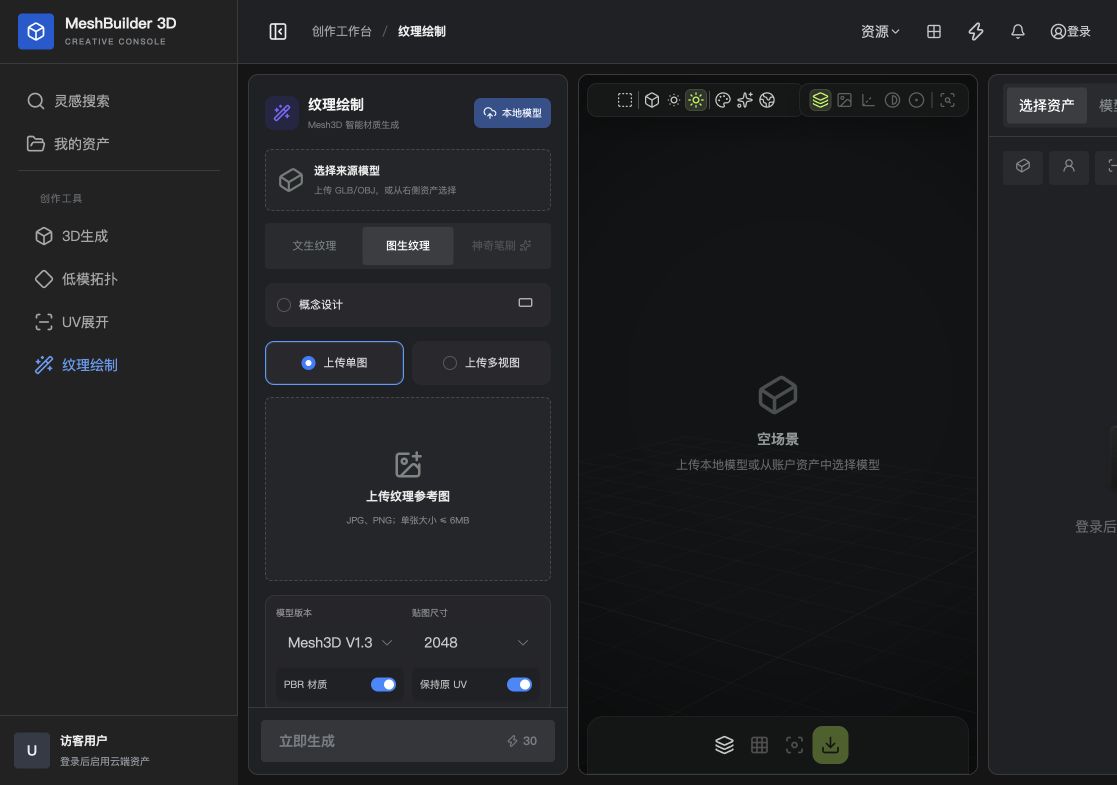
Prepare the model
Upload a GLB or OBJ, or choose an account asset. The model should have usable UVs; otherwise complete UV unwrapping first.
Reference modes
| Mode | How it works | Best for |
|---|---|---|
| Single image | Provide one concept or material reference | Establishing overall style and color quickly |
| Multi-view | Provide consistent images from multiple directions | Characters, products and directional details |
| Concept design | Strengthens interpretation of the design language | Concept art rather than a ready-made texture |
Output settings
- Texture size
- 1024 for fast previews, 2048 for balance, and 4096 for close-ups.
- PBR material
- Creates information for a standard physically based rendering workflow.
- Keep original UV
- Preserves existing UVs when they were edited manually or must remain compatible.
Procedure
- Choose a source
Load a UV-mapped GLB or OBJ.
- Choose references
Select single or multi-view and upload clear references.
- Set output
Choose resolution, PBR and UV preservation.
- Generate
Confirm the credit cost and submit.
- Inspect
Check seams, back, bottom and small parts from multiple angles.
Download the result or load it into another creation tool.
→