RETOPOLOGY
Retopology
Rebuild a high-poly model as a lighter triangle or quad mesh.
Last updated: 2026-08-20
Retopology reduces model complexity and reorganizes the mesh for games, web 3D, AR/VR, mobile presentation, rigging or further editing.
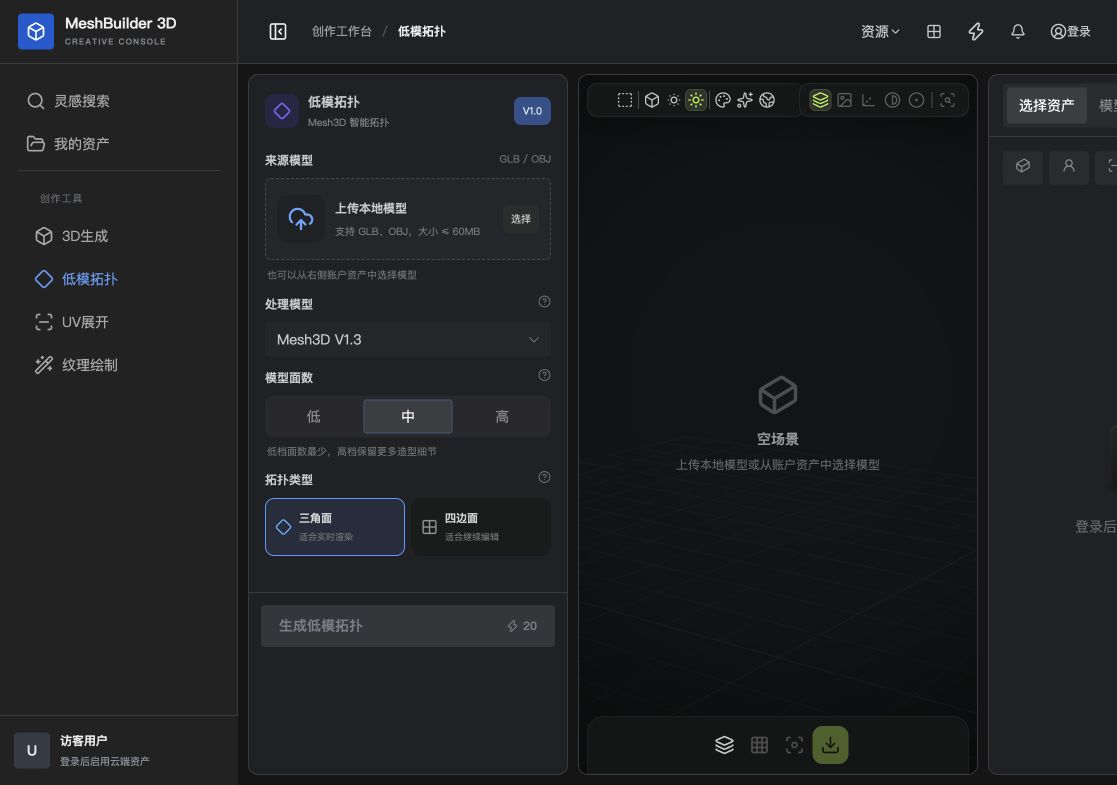
Supported inputs
Upload a GLB or OBJ up to 60 MB, or choose an existing model from account assets.
Polygon level
Fewest polygons for distant views, mobile and many instances.
A balance of silhouette and performance; a good first attempt.
Preserves more shape detail for close views and editing.
Topology type
| Type | Best for | Notes |
|---|---|---|
| Triangles | Game engines, real-time rendering and web 3D | Stable rendering, less convenient for loop editing |
| Quads | Sculpting, rigging, deformation and modeling | Easier to edit; inspect joints and thin surfaces |
Procedure
- Choose a source
Upload GLB/OBJ or select an asset.
- Choose a processing model
Use the latest Mesh3D V1.3 in most cases.
- Set polygon level
Start with Medium, then compare the silhouette.
- Choose topology
Use triangles for real-time rendering or try quads for editing.
- Generate and inspect
Check contours, holes, thin surfaces and joints.
Create 2D coordinates for the optimized model.
→